 PixPin
Appearance
v3.1.4.0 Release Notes
April 23, 2026
PixPin 3.1 stable focuses on adding Auto Mosaic, mouse passthrough for pinned images, Quick Recording, industrial barcode recognition, and more. It is especially useful for users who frequently need to redact information, continuously work with multiple pinned images, export screen recordings faster, or recognize shipping labels, product codes, and device tags. In addition, this release includes a set of practical improvements for saving, translation, screenshots, and the macOS experience.
Download
Windows
macOS
What's New
3.1.4.0
Features
Auto Mosaic Annotation Tool
When a screenshot contains phone numbers, addresses, employee IDs, document details, or other content that needs quick redaction, you can use the Auto Mosaic tool to batch-process identical content and reduce one-by-one manual covering.

After enabling sync operations, you can add or remove mosaics for identical content at the same time. This is useful for chat logs, table screenshots, and images with repeated information.
Mouse Passthrough for Pinned Images
The pin menu now includes Mouse Passthrough, which is useful when keeping reference images, flowcharts, or checklists floating on the desktop for long periods without getting in the way.
If you want to quickly toggle mouse passthrough with the keyboard, you can set a shortcut for "Toggle Mouse Passthrough" in Config - Shortcut/Actions.
Quick Recording Mode
Recording now includes a Quick Recording mode for scenarios where you want to export the result as soon as possible, such as recording a demo, submitting a bug reproduction, or quickly saving a short video clip.
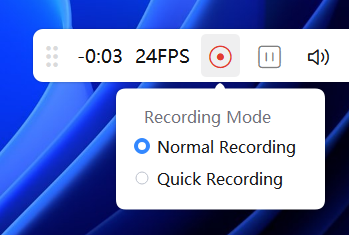
After recording finishes, PixPin skips playback, exports directly, and then exits.
Usage Notes
Before using Quick Recording, make sure the save location is set first.
- Only MP4 video can be exported.
- Mouse and keyboard animations cannot be added.
- Video boundaries and volume cannot be edited.
:::
[Members] Industrial Barcode Recognition
Members now support more industrial barcode types, including but not limited to Code128, EAN13, UPCA, Code39, DataMatrix, and PDF417. This is useful for organizing shipping labels, warehouse tags, device nameplates, and product codes.
Combined with the existing recognition workflow, it is now easier to extract common barcode information from complex screenshots.
- [Pin] Press
Tabon a pinned image to quickly switch focus to another pinned image. - [Pin] Files copied in VS Code can now also be pinned.
- [Annotation] Auto Mosaic now supports sync operations, allowing you to add or remove mosaics for identical content at the same time.
- [Translation] The translation dialog can now choose whether to show the original text.
- [macOS] macOS now also supports file pinning.
- [Spotlight] Press
Ctrl + Scroll Wheelto adjust the spotlight outline.
Settings
- [Pin] Added a setting to make pinned windows topmost or not by default, Config - Pin - Pinned Window Always on Top.
- [Pin] Pinned windows can now show a taskbar icon when they are not topmost, with a corresponding display setting added in Config - Pin - Show Taskbar Icon When Pinned Window Is Not Topmost.
Improvements
- [Annotation] Serial Number annotations now support manually setting the number.
- [Recording] Delayed screenshots and recordings now show a clear countdown.
- [Recording] Improved audio during fast playback.
- [Screenshot] Reduced stutter when screenshot sound effects are enabled.
- [Save] In the new save dialog, focus now defaults to the file name when the dialog opens, so you can quickly edit it and press
Enterto save. - [Save] Added an edit button to the path label in the save dialog.
- [Save] Added an "Overwrite Existing File" confirmation dialog to prevent accidental replacement.
- [Translation] On macOS, the translation shortcut has been changed to
Option + Q. - [Table Recognition] Improved table recognition accuracy.
- [Recognition] Improved the QR code recognition experience.
- [Screenshot] When Rounded Corner Screenshot is enabled, a corner-radius control handle now appears when you move the cursor near a corner of the screenshot area.