 PixPin
Appearance
v2.3.8 Changelog
January 5, 2026
This update brings several useful features: automatic scrolling for Scrolling Screenshots, QR code recognition for Pinned Images, and the ability to hide other Pinned Images to focus on the current one. Windows users can also experience the Window Pin feature, which dynamically projects the content of a specified window onto a Pinned Image. Additionally, we have fixed some issues reported by users to improve the overall experience.
Downloads
Windows
MacOS
Release Notes
2.3.8

Added auto-scroll feature for Scrolling Screenshot. Click the "Auto Scroll" button in the screenshot toolbar to start auto-scrolling.

(Windows) Added Window Pin type. Press the Window Pin button when pinning to dynamically project the content of a specified window range onto the Pinned Image.

Shake the Pinned Image with the mouse to hide/show other Pinned Images.
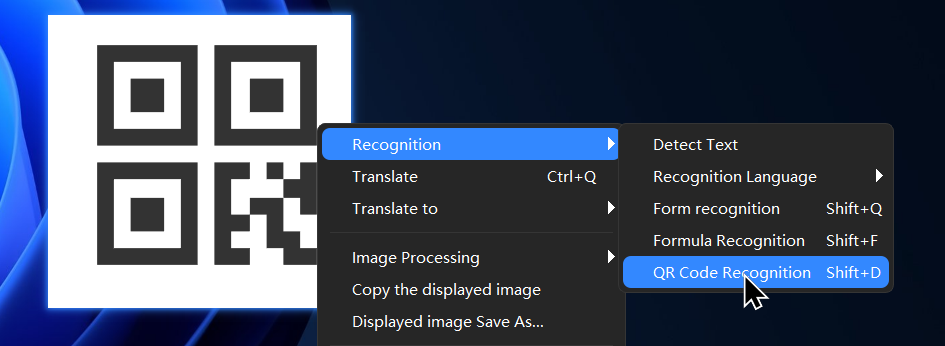
Added QR code recognition for Image Pins. Right-click menu "Recognize" - "QR Code Recognize".
- [Pin] Added "Hide Other Pins" option to the Pinned Image right-click menu.
- [Settings] Enhanced customization for the color format of the screenshot magnifier.
- [Settings] "Save" - "Auto Save" added an option to clean up old files, allowing you to set how many days of files to automatically clean.
- [Feature] (Windows) Added "Pin with PixPin" option to the context menu (configurable in Settings).
- [Feature] (Windows) Added an option to disable shortcuts in full-screen game mode (configurable in the Tray Menu or Settings).